Code Optimization for Differential Equations
See this FAQ for information on common pitfalls and how to improve performance.
Code Optimization in Julia
Before starting this tutorial, we recommend the reader to check out one of the many tutorials for optimization Julia code. The following is an incomplete list:
- The Julia Performance Tips
- MIT 18.337 Course Notes on Optimizing Serial Code
- What scientists must know about hardware to write fast code
User-side optimizations are important because, for sufficiently difficult problems, most time will be spent inside your f function, the function you are trying to solve. “Efficient” integrators are those that reduce the required number of f calls to hit the error tolerance. The main ideas for optimizing your DiffEq code, or any Julia function, are the following:
- Make it non-allocating
- Use StaticArrays for small arrays
- Use broadcast fusion
- Make it type-stable
- Reduce redundant calculations
- Make use of BLAS calls
- Optimize algorithm choice
We'll discuss these strategies in the context of differential equations. Let's start with small systems.
Example Accelerating a Non-Stiff Equation: The Lorenz Equation
Let's take the classic Lorenz system. Let's start by naively writing the system in its out-of-place form:
function lorenz(u, p, t)
    dx = 10.0 * (u[2] - u[1])
    dy = u[1] * (28.0 - u[3]) - u[2]
    dz = u[1] * u[2] - (8 / 3) * u[3]
    [dx, dy, dz]
end
lorenz (generic function with 1 method)Here, lorenz returns an object, [dx,dy,dz], which is created within the body of lorenz.
This is a common code pattern from high-level languages like MATLAB, SciPy, or R's deSolve. However, the issue with this form is that it allocates a vector, [dx,dy,dz], at each step. Let's benchmark the solution process with this choice of function:
import DifferentialEquations as DE, BenchmarkTools as BT
u0 = [1.0; 0.0; 0.0]
tspan = (0.0, 100.0)
prob = DE.ODEProblem(lorenz, u0, tspan)
BT.@btime DE.solve(prob, DE.Tsit5());
2.023 ms (203115 allocations: 7.85 MiB)The BenchmarkTools.jl package's BT.@benchmark runs the code multiple times to get an accurate measurement. The minimum time is the time it takes when your OS and other background processes aren't getting in the way. Notice that in this case it takes about 5ms to solve and allocates around 11.11 MiB. However, if we were to use this inside of a real user code, we'd see a lot of time spent doing garbage collection (GC) to clean up all the arrays we made. Even if we turn off saving, we have these allocations.
BT.@btime DE.solve(prob, DE.Tsit5(); save_everystep = false); 1.776 ms (179758 allocations: 6.87 MiB)The problem, of course, is that arrays are created every time our derivative function is called. This function is called multiple times per step and is thus the main source of memory usage. To fix this, we can use the in-place form to ***make our code non-allocating***:
function lorenz!(du, u, p, t)
    du[1] = 10.0 * (u[2] - u[1])
    du[2] = u[1] * (28.0 - u[3]) - u[2]
    du[3] = u[1] * u[2] - (8 / 3) * u[3]
    nothing
end
lorenz! (generic function with 1 method)Here, instead of creating an array each time, we utilized the cache array du. When the in-place form is used, DifferentialEquations.jl takes a different internal route that minimizes the internal allocations as well.
Notice that nothing is returned. When in in-place form, the ODE solver ignores the return. Instead, make sure that the original du array is mutated instead of constructing a new array
When we benchmark this function, we will see quite a difference.
u0 = [1.0; 0.0; 0.0]
tspan = (0.0, 100.0)
prob = DE.ODEProblem(lorenz!, u0, tspan)
BT.@btime DE.solve(prob, DE.Tsit5());
532.295 μs (22528 allocations: 970.41 KiB)BT.@btime DE.solve(prob, DE.Tsit5(); save_everystep = false); 309.218 μs (71 allocations: 4.01 KiB)There is a 16x time difference just from that change! Notice there are still some allocations and this is due to the construction of the integration cache. But this doesn't scale with the problem size:
tspan = (0.0, 500.0) # 5x longer than before
prob = DE.ODEProblem(lorenz!, u0, tspan)
BT.@btime DE.solve(prob, DE.Tsit5(); save_everystep = false);
1.636 ms (71 allocations: 4.01 KiB)Since that's all setup allocations, the user-side optimization is complete.
Further Optimizations of Small Non-Stiff ODEs with StaticArrays
Allocations are only expensive if they are “heap allocations”. For a more in-depth definition of heap allocations, there are many sources online. But a good working definition is that heap allocations are variable-sized slabs of memory which have to be pointed to, and this pointer indirection costs time. Additionally, the heap has to be managed, and the garbage controllers has to actively keep track of what's on the heap.
However, there's an alternative to heap allocations, known as stack allocations. The stack is statically-sized (known at compile time) and thus its accesses are quick. Additionally, the exact block of memory is known in advance by the compiler, and thus re-using the memory is cheap. This means that allocating on the stack has essentially no cost!
Arrays have to be heap allocated because their size (and thus the amount of memory they take up) is determined at runtime. But there are structures in Julia which are stack-allocated. structs for example are stack-allocated “value-type”s. Tuples are a stack-allocated collection. The most useful data structure for DiffEq though is the StaticArray from the package StaticArrays.jl. These arrays have their length determined at compile-time. They are created using macros attached to normal array expressions, for example:
import StaticArrays
A = StaticArrays.SA[2.0, 3.0, 5.0]
typeof(A) # StaticArrays.SVector{3, Float64} (alias for StaticArrays.SArray{Tuple{3}, Float64, 1, 3})
SVector{3, Float64} (alias for StaticArraysCore.SArray{Tuple{3}, Float64, 1, 3})Notice that the 3 after StaticArrays.SVector gives the size of the StaticArrays.SVector. It cannot be changed. Additionally, StaticArrays.SVectors are immutable, so we have to create a new StaticArrays.SVector to change values. But remember, we don't have to worry about allocations because this data structure is stack-allocated. SArrays have numerous extra optimizations as well: they have fast matrix multiplication, fast QR factorizations, etc. which directly make use of the information about the size of the array. Thus, when possible, they should be used.
Unfortunately, static arrays can only be used for sufficiently small arrays. After a certain size, they are forced to heap allocate after some instructions and their compile time balloons. Thus, static arrays shouldn't be used if your system has more than ~20 variables. Additionally, only the native Julia algorithms can fully utilize static arrays.
Let's ***optimize lorenz using static arrays***. Note that in this case, we want to use the out-of-place allocating form, but this time we want to output a static array:
function lorenz_static(u, p, t)
    dx = 10.0 * (u[2] - u[1])
    dy = u[1] * (28.0 - u[3]) - u[2]
    dz = u[1] * u[2] - (8 / 3) * u[3]
    StaticArrays.SA[dx, dy, dz]
end
lorenz_static (generic function with 1 method)To make the solver internally use static arrays, we simply give it a static array as the initial condition:
u0 = StaticArrays.SA[1.0, 0.0, 0.0]
tspan = (0.0, 100.0)
prob = DE.ODEProblem(lorenz_static, u0, tspan)
BT.@btime DE.solve(prob, DE.Tsit5());
234.017 μs (2539 allocations: 359.40 KiB)BT.@btime DE.solve(prob, DE.Tsit5(); save_everystep = false); 185.046 μs (31 allocations: 2.38 KiB)And that's pretty much all there is to it. With static arrays, you don't have to worry about allocating, so use operations like * and don't worry about fusing operations (discussed in the next section). Do “the vectorized code” of R/MATLAB/Python and your code in this case will be fast, or directly use the numbers/values.
Example Accelerating a Stiff Equation: the Robertson Equation
For these next examples, let's solve the Robertson equations (also known as ROBER):
\[\begin{aligned} \frac{dy_1}{dt} &= -0.04y₁ + 10^4 y_2 y_3 \\ \frac{dy_2}{dt} &= 0.04 y_1 - 10^4 y_2 y_3 - 3×10^7 y_{2}^2 \\ \frac{dy_3}{dt} &= 3×10^7 y_{2}^2 \\ \end{aligned}\]
Given that these equations are stiff, non-stiff ODE solvers like DE.Tsit5 or DE.Vern9 will fail to solve these equations. The automatic algorithm will detect this and automatically switch to something more robust to handle these issues. For example:
import DifferentialEquations as DE
import Plots
function rober!(du, u, p, t)
    y₁, y₂, y₃ = u
    k₁, k₂, k₃ = p
    du[1] = -k₁ * y₁ + k₃ * y₂ * y₃
    du[2] = k₁ * y₁ - k₂ * y₂^2 - k₃ * y₂ * y₃
    du[3] = k₂ * y₂^2
    nothing
end
prob = DE.ODEProblem(rober!, [1.0, 0.0, 0.0], (0.0, 1e5), [0.04, 3e7, 1e4])
sol = DE.solve(prob)
Plots.plot(sol, tspan = (1e-2, 1e5), xscale = :log10)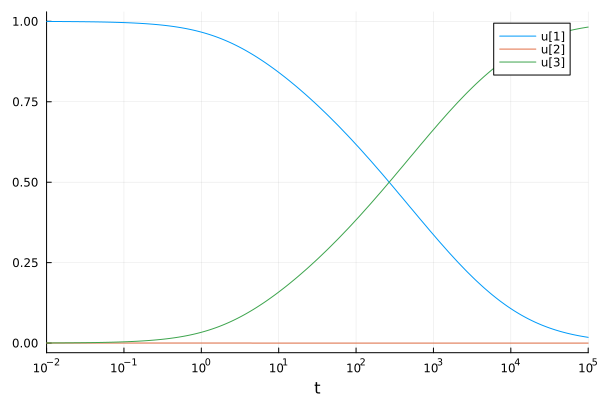
import BenchmarkTools as BT
BT.@btime DE.solve(prob);
106.993 μs (2451 allocations: 367.20 KiB)Choosing a Good Solver
Choosing a good solver is required for getting top-notch speed. General recommendations can be found on the solver page (for example, the ODE Solver Recommendations). The current recommendations can be simplified to a Rosenbrock method (Rosenbrock23 or Rodas5P, both from OrdinaryDiffEqRosenbrock; Rosenbrock23 and Rodas5P are in the default OrdinaryDiffEq re-export set, the rest of the Rosenbrock family — including Rodas5 — needs an explicit using OrdinaryDiffEqRosenbrock) for smaller (<50 ODEs) problems, ESDIRK methods for slightly larger (TRBDF2 or KenCarp4 from OrdinaryDiffEqSDIRK for <2000 ODEs), and QNDF (from OrdinaryDiffEqBDF) for even larger problems. lsoda from LSODA.jl is sometimes worth a try for the medium-sized category. Under DifferentialEquations.jl v8 the umbrella using DifferentialEquations only re-exports OrdinaryDiffEq's default solver set; non-default solvers must be imported from their host sublibrary.
More details on the solver to choose can be found by benchmarking. See the SciMLBenchmarks to compare many solvers on many problems.
From this, we try the recommendation of DE.Rosenbrock23() for stiff ODEs at default tolerances:
BT.@btime DE.solve(prob, DE.Rosenbrock23()); 63.692 μs (655 allocations: 34.31 KiB)Declaring Jacobian Functions
In order to reduce the Jacobian construction cost, one can describe a Jacobian function by using the jac argument for the DE.ODEFunction. First we have to derive the Jacobian $\frac{df_i}{du_j}$ which is J[i,j]. From this, we get:
function rober_jac!(J, u, p, t)
    y₁, y₂, y₃ = u
    k₁, k₂, k₃ = p
    J[1, 1] = k₁ * -1
    J[2, 1] = k₁
    J[3, 1] = 0
    J[1, 2] = y₃ * k₃
    J[2, 2] = y₂ * k₂ * -2 + y₃ * k₃ * -1
    J[3, 2] = y₂ * 2 * k₂
    J[1, 3] = k₃ * y₂
    J[2, 3] = k₃ * y₂ * -1
    J[3, 3] = 0
    nothing
end
f! = DE.ODEFunction(rober!, jac = rober_jac!)
prob_jac = DE.ODEProblem(f!, [1.0, 0.0, 0.0], (0.0, 1e5), (0.04, 3e7, 1e4))
ODEProblem with uType Vector{Float64} and tType Float64. In-place: true
Non-trivial mass matrix: false
timespan: (0.0, 100000.0)
u0: 3-element Vector{Float64}:
1.0
0.0
0.0BT.@btime DE.solve(prob_jac, DE.Rosenbrock23()); 55.352 μs (594 allocations: 31.48 KiB)Automatic Derivation of Jacobian Functions
But that was hard! If you want to take the symbolic Jacobian of numerical code, we can make use of ModelingToolkit.jl to symbolic-ify the numerical code and do the symbolic calculation and return the Julia code for this.
import ModelingToolkit as MTK
de = MTK.complete(MTK.modelingtoolkitize(prob))
\[ \begin{align} \frac{\mathrm{d} ~ \mathtt{x_1}\left( t \right)}{\mathrm{d}t} &= - \mathtt{x_1}\left( t \right) ~ \mathtt{\alpha_1} + \mathtt{x_2}\left( t \right) ~ \mathtt{x_3}\left( t \right) ~ \mathtt{\alpha_3} \\ \frac{\mathrm{d} ~ \mathtt{x_2}\left( t \right)}{\mathrm{d}t} &= \mathtt{x_1}\left( t \right) ~ \mathtt{\alpha_1} - \left( \mathtt{x_2}\left( t \right) \right)^{2} ~ \mathtt{\alpha_2} - \mathtt{x_2}\left( t \right) ~ \mathtt{x_3}\left( t \right) ~ \mathtt{\alpha_3} \\ \frac{\mathrm{d} ~ \mathtt{x_3}\left( t \right)}{\mathrm{d}t} &= \left( \mathtt{x_2}\left( t \right) \right)^{2} ~ \mathtt{\alpha_2} \end{align} \]
We can tell it to compute the Jacobian if we want to see the code:
MTK.generate_jacobian(de)[2] # Second is in-place:(function (__argₛᵧₘ1401282876548370056, ___mtkunknowns___, ___mtkparameters___, __argₛᵧₘ1249670312406203976)
#= line 0 =# @inbounds begin
begin
begin
__miscₛᵧₘ0 = ___mtkparameters___[1]
__mtk_arg_2 = __miscₛᵧₘ0
__miscₛᵧₘ1 = ___mtkparameters___[2]
__mtk_arg_3 = __miscₛᵧₘ1
__miscₛᵧₘ2 = ___mtkunknowns___
__mtk_arg_1 = __miscₛᵧₘ2
var"##cse#0" = __argₛᵧₘ1401282876548370056
__miscₛᵧₘ3 = 1
var"##cse#1" = -1
var"##cse#2" = __mtk_arg_2[1]
var"##cse#3" = (*)(var"##cse#1", var"##cse#2")
__miscₛᵧₘ4 = 2
__miscₛᵧₘ5 = 3
var"##cse#4" = 0
__miscₛᵧₘ6 = 4
var"##cse#5" = ___mtkunknowns___[3]
var"##cse#6" = __mtk_arg_2[3]
var"##cse#7" = (*)(var"##cse#5", var"##cse#6")
__miscₛᵧₘ7 = 5
var"##cse#8" = -2
var"##cse#9" = __mtk_arg_2[2]
var"##cse#10" = ___mtkunknowns___[2]
var"##cse#11" = (*)(var"##cse#8", var"##cse#9", var"##cse#10")
var"##cse#12" = (*)(var"##cse#1", var"##cse#5", var"##cse#6")
var"##cse#13" = (+)(var"##cse#11", var"##cse#12")
__miscₛᵧₘ8 = 6
var"##cse#14" = 2
var"##cse#15" = (*)(var"##cse#14", var"##cse#9", var"##cse#10")
__miscₛᵧₘ9 = 7
var"##cse#16" = (*)(var"##cse#10", var"##cse#6")
__miscₛᵧₘ10 = 8
var"##cse#17" = (*)(var"##cse#1", var"##cse#10", var"##cse#6")
__miscₛᵧₘ11 = 9
__miscₛᵧₘ13 = #= line 0 =# @inbounds(begin
var"##cse#0"[__miscₛᵧₘ3] = var"##cse#3"
var"##cse#0"[__miscₛᵧₘ4] = var"##cse#2"
var"##cse#0"[__miscₛᵧₘ5] = var"##cse#4"
var"##cse#0"[__miscₛᵧₘ6] = var"##cse#7"
var"##cse#0"[__miscₛᵧₘ7] = var"##cse#13"
var"##cse#0"[__miscₛᵧₘ8] = var"##cse#15"
var"##cse#0"[__miscₛᵧₘ9] = var"##cse#16"
var"##cse#0"[__miscₛᵧₘ10] = var"##cse#17"
var"##cse#0"[__miscₛᵧₘ11] = var"##cse#4"
__miscₛᵧₘ12 = var"##cse#0"
end)
end
end
end
end)Now let's use that to give the analytical solution Jacobian:
prob_jac2 = DE.ODEProblem(de, [], (0.0, 1e5); jac = true)ODEProblem with uType Vector{Float64} and tType Float64. In-place: true
Initialization status: FULLY_DETERMINED
Non-trivial mass matrix: false
timespan: (0.0, 100000.0)
u0: 3-element Vector{Float64}:
1.0
0.0
0.0BT.@btime DE.solve(prob_jac2); 152.454 μs (2668 allocations: 375.34 KiB)See the ModelingToolkit.jl documentation for more details.
Accelerating Small ODE Solves with Static Arrays
If the ODE is sufficiently small (<20 ODEs or so), using StaticArrays.jl for the state variables can greatly enhance the performance. This is done by making u0 a StaticArray and writing an out-of-place non-mutating dispatch for static arrays, for the ROBER problem, this looks like:
import StaticArrays
function rober_static(u, p, t)
    y₁, y₂, y₃ = u
    k₁, k₂, k₃ = p
    du1 = -k₁ * y₁ + k₃ * y₂ * y₃
    du2 = k₁ * y₁ - k₂ * y₂^2 - k₃ * y₂ * y₃
    du3 = k₂ * y₂^2
    StaticArrays.SA[du1, du2, du3]
end
prob = DE.ODEProblem(rober_static, StaticArrays.SA[1.0, 0.0, 0.0], (0.0, 1e5), StaticArrays.SA[0.04, 3e7, 1e4])
sol = DE.solve(prob, DE.Rosenbrock23())
retcode: Success
Interpolation: specialized 2nd order "free" stiffness-aware interpolation
t: 61-element Vector{Float64}:
0.0
3.196206628740808e-5
0.00014400709669791316
0.00025605212710841824
0.00048593872520561496
0.0007179482298405134
0.0010819240431281
0.0014801655696439716
0.0020679567767069723
0.0028435846274559506
⋮
25371.934242574636
30784.11997687391
37217.42637183451
44850.61378119757
53893.69155452613
64593.73799781129
77241.71960460565
92180.81944906656
100000.0
u: 61-element Vector{StaticArraysCore.SVector{3, Float64}}:
[1.0, 0.0, 0.0]
[0.9999987215181657, 1.2780900152625978e-6, 3.9181897521319503e-10]
[0.9999942397327672, 5.718510591908378e-6, 4.175664083814195e-8]
[0.9999897579685716, 9.992106860321925e-6, 2.4992456809854223e-7]
[0.99998056266788, 1.7833624284594367e-5, 1.6037078354141815e-6]
[0.9999712826600025, 2.403488607694387e-5, 4.6824539206438825e-6]
[0.9999567250106862, 3.0390689558961382e-5, 1.2884299754832173e-5]
[0.999940798607161, 3.388427373871301e-5, 2.531711910029394e-5]
[0.9999172960308617, 3.583508668595173e-5, 4.686888245237194e-5]
[0.9998862913719596, 3.641240165367128e-5, 7.729622638673522e-5]
⋮
[0.05563507731000892, 2.3546320422346656e-7, 0.9443646872267862]
[0.047925348764047145, 2.0121495043224824e-7, 0.9520744500210009]
[0.04123342149003371, 1.71927881668911e-7, 0.9587664065820825]
[0.03543699837030759, 1.4688361975260185e-7, 0.9645628547460711]
[0.030425371816164174, 1.2546809318472792e-7, 0.9695745027157405]
[0.026099132201150267, 1.0715608431718063e-7, 0.9739007606427643]
[0.022369691694550272, 9.149844876161182e-8, 0.9776302168069994]
[0.019158563313533352, 7.811096380138788e-8, 0.980841358575501]
[0.01782789385075189, 7.258919982166399e-8, 0.9821720335600466]If we benchmark this, we see a really fast solution with really low allocation counts:
BT.@btime sol = DE.solve(prob, DE.Rosenbrock23()); 19.290 μs (159 allocations: 20.82 KiB)This version is thus very amenable to multithreading and other forms of parallelism.
Example Accelerating Linear Algebra PDE Semi-Discretization
In this tutorial, we will optimize the right-hand side definition of a PDE semi-discretization.
We highly recommend looking at the Solving Large Stiff Equations tutorial for details on customizing DifferentialEquations.jl for more efficient large-scale stiff ODE solving. This section will only focus on the user-side code.
Let's optimize the solution of a Reaction-Diffusion PDE's discretization. In its discretized form, this is the ODE:
\[\begin{align*} du &= D_1 (A_y u + u A_x) + \frac{au^2}{v} + \bar{u} - \alpha u\\ dv &= D_2 (A_y v + v A_x) + a u^2 + \beta v \end{align*}\]
where $u$, $v$, and $A$ are matrices. Here, we will use the simplified version where $A$ is the tridiagonal stencil $[1,-2,1]$, i.e. it's the 2D discretization of the Laplacian. The native code would be something along the lines of:
import DifferentialEquations as DE, LinearAlgebra as LA, BenchmarkTools as BT
# Generate the constants
p = (1.0, 1.0, 1.0, 10.0, 0.001, 100.0) # a,α,ubar,β,D1,D2
N = 100
Ax = Array(LA.Tridiagonal([1.0 for i in 1:(N - 1)], [-2.0 for i in 1:N],
    [1.0 for i in 1:(N - 1)]))
Ay = copy(Ax)
Ax[2, 1] = 2.0
Ax[end - 1, end] = 2.0
Ay[1, 2] = 2.0
Ay[end, end - 1] = 2.0

function basic_version!(dr, r, p, t)
    a, α, ubar, β, D1, D2 = p
    u = r[:, :, 1]
    v = r[:, :, 2]
    Du = D1 * (Ay * u + u * Ax)
    Dv = D2 * (Ay * v + v * Ax)
    dr[:, :, 1] = Du .+ a .* u .* u ./ v .+ ubar .- α * u
    dr[:, :, 2] = Dv .+ a .* u .* u .- β * v
end

a, α, ubar, β, D1, D2 = p
uss = (ubar + β) / α
vss = (a / β) * uss^2
r0 = zeros(100, 100, 2)
r0[:, :, 1] .= uss .+ 0.1 .* rand.()
r0[:, :, 2] .= vss

prob = DE.ODEProblem(basic_version!, r0, (0.0, 0.1), p)
ODEProblem with uType Array{Float64, 3} and tType Float64. In-place: true
Non-trivial mass matrix: false
timespan: (0.0, 0.1)
u0: 100×100×2 Array{Float64, 3}:
[:, :, 1] =
11.0371 11.0344 11.0256 11.0556 … 11.0729 11.0801 11.0939 11.0421
11.0866 11.0182 11.0951 11.0719 11.0865 11.0207 11.0106 11.0711
11.0102 11.0734 11.0018 11.0171 11.0572 11.0937 11.0387 11.0769
11.0303 11.0324 11.0765 11.0245 11.0041 11.0216 11.0878 11.0652
11.0544 11.0343 11.0224 11.0689 11.0107 11.0981 11.0178 11.0923
11.0962 11.026 11.0592 11.0038 … 11.0435 11.097 11.0413 11.0882
11.0704 11.0077 11.0784 11.0407 11.002 11.0932 11.0916 11.0307
11.0699 11.0643 11.0448 11.0807 11.0218 11.0218 11.0539 11.0144
11.0228 11.0004 11.0266 11.0087 11.0889 11.0638 11.0624 11.0206
11.0467 11.0061 11.0607 11.0098 11.087 11.0856 11.0403 11.0498
⋮ ⋱
11.024 11.0068 11.0926 11.0066 11.038 11.0038 11.0354 11.0717
11.0803 11.0778 11.0446 11.0946 11.064 11.0041 11.0047 11.0866
11.0801 11.0527 11.0172 11.0906 11.0935 11.0552 11.0239 11.0657
11.0078 11.0433 11.0312 11.0112 11.0988 11.0575 11.078 11.0587
11.0682 11.0178 11.0357 11.0996 … 11.0434 11.0074 11.0446 11.012
11.0187 11.0485 11.0319 11.0178 11.0224 11.0028 11.0789 11.0284
11.0934 11.087 11.0734 11.0144 11.0182 11.0692 11.0087 11.0743
11.0072 11.0582 11.014 11.0699 11.0597 11.0503 11.0639 11.0598
11.0608 11.0903 11.0447 11.0515 11.0246 11.0283 11.0824 11.0797
[:, :, 2] =
12.1 12.1 12.1 12.1 12.1 12.1 … 12.1 12.1 12.1 12.1 12.1 12.1
12.1 12.1 12.1 12.1 12.1 12.1 12.1 12.1 12.1 12.1 12.1 12.1
12.1 12.1 12.1 12.1 12.1 12.1 12.1 12.1 12.1 12.1 12.1 12.1
12.1 12.1 12.1 12.1 12.1 12.1 12.1 12.1 12.1 12.1 12.1 12.1
12.1 12.1 12.1 12.1 12.1 12.1 12.1 12.1 12.1 12.1 12.1 12.1
12.1 12.1 12.1 12.1 12.1 12.1 … 12.1 12.1 12.1 12.1 12.1 12.1
12.1 12.1 12.1 12.1 12.1 12.1 12.1 12.1 12.1 12.1 12.1 12.1
12.1 12.1 12.1 12.1 12.1 12.1 12.1 12.1 12.1 12.1 12.1 12.1
12.1 12.1 12.1 12.1 12.1 12.1 12.1 12.1 12.1 12.1 12.1 12.1
12.1 12.1 12.1 12.1 12.1 12.1 12.1 12.1 12.1 12.1 12.1 12.1
⋮ ⋮ ⋱ ⋮
12.1 12.1 12.1 12.1 12.1 12.1 12.1 12.1 12.1 12.1 12.1 12.1
12.1 12.1 12.1 12.1 12.1 12.1 12.1 12.1 12.1 12.1 12.1 12.1
12.1 12.1 12.1 12.1 12.1 12.1 12.1 12.1 12.1 12.1 12.1 12.1
12.1 12.1 12.1 12.1 12.1 12.1 12.1 12.1 12.1 12.1 12.1 12.1
12.1 12.1 12.1 12.1 12.1 12.1 … 12.1 12.1 12.1 12.1 12.1 12.1
12.1 12.1 12.1 12.1 12.1 12.1 12.1 12.1 12.1 12.1 12.1 12.1
12.1 12.1 12.1 12.1 12.1 12.1 12.1 12.1 12.1 12.1 12.1 12.1
12.1 12.1 12.1 12.1 12.1 12.1 12.1 12.1 12.1 12.1 12.1 12.1
12.1 12.1 12.1 12.1 12.1 12.1 12.1 12.1 12.1 12.1 12.1 12.1In this version, we have encoded our initial condition to be a 3-dimensional array, with u[:,:,1] being the A part and u[:,:,2] being the B part.
BT.@btime DE.solve(prob, DE.Tsit5()); 39.855 ms (8893 allocations: 186.88 MiB)While this version isn't very efficient,
We recommend writing the “high-level” code first, and iteratively optimizing it!
The first thing that we can do is get rid of the slicing allocations. The operation r[:,:,1] creates a temporary array instead of a “view”, i.e. a pointer to the already existing memory. To make it a view, add @view. Note that we have to be careful with views because they point to the same memory, and thus changing a view changes the original values:
A = rand(4)
@show A
B = @view A[1:3]
B[2] = 2
@show A
4-element Vector{Float64}:
0.12361190763143459
2.0
0.317194968439353
0.44693921253470537Notice that changing B changed A. This is something to be careful of, but at the same time we want to use this since we want to modify the output dr. Additionally, the last statement is a purely element-wise operation, and thus we can make use of broadcast fusion there. Let's rewrite basic_version! to ***avoid slicing allocations*** and to ***use broadcast fusion***:
function gm2!(dr, r, p, t)
    a, α, ubar, β, D1, D2 = p
    u = @view r[:, :, 1]
    v = @view r[:, :, 2]
    du = @view dr[:, :, 1]
    dv = @view dr[:, :, 2]
    Du = D1 * (Ay * u + u * Ax)
    Dv = D2 * (Ay * v + v * Ax)
    @. du = Du + a .* u .* u ./ v + ubar - α * u
    @. dv = Dv + a .* u .* u - β * v
end
prob = DE.ODEProblem(gm2!, r0, (0.0, 0.1), p)
BT.@btime DE.solve(prob, DE.Tsit5());
35.368 ms (6688 allocations: 119.66 MiB)Now, most of the allocations are taking place in Du = D1*(Ay*u + u*Ax) since those operations are vectorized and not mutating. We should instead replace the matrix multiplications with LA.mul!. When doing so, we will need to have cache variables to write into. This looks like:
Ayu = zeros(N, N)
uAx = zeros(N, N)
Du = zeros(N, N)
Ayv = zeros(N, N)
vAx = zeros(N, N)
Dv = zeros(N, N)
function gm3!(dr, r, p, t)
    a, α, ubar, β, D1, D2 = p
    u = @view r[:, :, 1]
    v = @view r[:, :, 2]
    du = @view dr[:, :, 1]
    dv = @view dr[:, :, 2]
    LA.mul!(Ayu, Ay, u)
    LA.mul!(uAx, u, Ax)
    LA.mul!(Ayv, Ay, v)
    LA.mul!(vAx, v, Ax)
    @. Du = D1 * (Ayu + uAx)
    @. Dv = D2 * (Ayv + vAx)
    @. du = Du + a * u * u ./ v + ubar - α * u
    @. dv = Dv + a * u * u - β * v
end
prob = DE.ODEProblem(gm3!, r0, (0.0, 0.1), p)
BT.@btime DE.solve(prob, DE.Tsit5());
31.948 ms (3748 allocations: 29.86 MiB)But our temporary variables are global variables. We need to either declare the caches as const or localize them. We can localize them by adding them to the parameters, p. It's easier for the compiler to reason about local variables than global variables. ***Localizing variables helps to ensure type stability***.
p = (1.0, 1.0, 1.0, 10.0, 0.001, 100.0, Ayu, uAx, Du, Ayv, vAx, Dv) # a,α,ubar,β,D1,D2
function gm4!(dr, r, p, t)
    a, α, ubar, β, D1, D2, Ayu, uAx, Du, Ayv, vAx, Dv = p
    u = @view r[:, :, 1]
    v = @view r[:, :, 2]
    du = @view dr[:, :, 1]
    dv = @view dr[:, :, 2]
    LA.mul!(Ayu, Ay, u)
    LA.mul!(uAx, u, Ax)
    LA.mul!(Ayv, Ay, v)
    LA.mul!(vAx, v, Ax)
    @. Du = D1 * (Ayu + uAx)
    @. Dv = D2 * (Ayv + vAx)
    @. du = Du + a * u * u ./ v + ubar - α * u
    @. dv = Dv + a * u * u - β * v
end
prob = DE.ODEProblem(gm4!, r0, (0.0, 0.1), p)
BT.@btime DE.solve(prob, DE.Tsit5());
31.748 ms (1249 allocations: 29.66 MiB)We could then use the BLAS gemmv to optimize the matrix multiplications some more, but instead let's devectorize the stencil.
p = (1.0, 1.0, 1.0, 10.0, 0.001, 100.0, N)
function fast_gm!(du, u, p, t)
    a, α, ubar, β, D1, D2, N = p

    @inbounds for j in 2:(N - 1), i in 2:(N - 1)

        du[i, j, 1] = D1 *
                      (u[i - 1, j, 1] + u[i + 1, j, 1] + u[i, j + 1, 1] + u[i, j - 1, 1] -
                       4u[i, j, 1]) +
                      a * u[i, j, 1]^2 / u[i, j, 2] + ubar - α * u[i, j, 1]
    end

    @inbounds for j in 2:(N - 1), i in 2:(N - 1)

        du[i, j, 2] = D2 *
                      (u[i - 1, j, 2] + u[i + 1, j, 2] + u[i, j + 1, 2] + u[i, j - 1, 2] -
                       4u[i, j, 2]) +
                      a * u[i, j, 1]^2 - β * u[i, j, 2]
    end

    @inbounds for j in 2:(N - 1)
        i = 1
        du[1, j, 1] = D1 *
                      (2u[i + 1, j, 1] + u[i, j + 1, 1] + u[i, j - 1, 1] - 4u[i, j, 1]) +
                      a * u[i, j, 1]^2 / u[i, j, 2] + ubar - α * u[i, j, 1]
    end
    @inbounds for j in 2:(N - 1)
        i = 1
        du[1, j, 2] = D2 *
                      (2u[i + 1, j, 2] + u[i, j + 1, 2] + u[i, j - 1, 2] - 4u[i, j, 2]) +
                      a * u[i, j, 1]^2 - β * u[i, j, 2]
    end
    @inbounds for j in 2:(N - 1)
        i = N
        du[end, j, 1] = D1 *
                        (2u[i - 1, j, 1] + u[i, j + 1, 1] + u[i, j - 1, 1] - 4u[i, j, 1]) +
                        a * u[i, j, 1]^2 / u[i, j, 2] + ubar - α * u[i, j, 1]
    end
    @inbounds for j in 2:(N - 1)
        i = N
        du[end, j, 2] = D2 *
                        (2u[i - 1, j, 2] + u[i, j + 1, 2] + u[i, j - 1, 2] - 4u[i, j, 2]) +
                        a * u[i, j, 1]^2 - β * u[i, j, 2]
    end

    @inbounds for i in 2:(N - 1)
        j = 1
        du[i, 1, 1] = D1 *
                      (u[i - 1, j, 1] + u[i + 1, j, 1] + 2u[i, j + 1, 1] - 4u[i, j, 1]) +
                      a * u[i, j, 1]^2 / u[i, j, 2] + ubar - α * u[i, j, 1]
    end
    @inbounds for i in 2:(N - 1)
        j = 1
        du[i, 1, 2] = D2 *
                      (u[i - 1, j, 2] + u[i + 1, j, 2] + 2u[i, j + 1, 2] - 4u[i, j, 2]) +
                      a * u[i, j, 1]^2 - β * u[i, j, 2]
    end
    @inbounds for i in 2:(N - 1)
        j = N
        du[i, end, 1] = D1 *
                        (u[i - 1, j, 1] + u[i + 1, j, 1] + 2u[i, j - 1, 1] - 4u[i, j, 1]) +
                        a * u[i, j, 1]^2 / u[i, j, 2] + ubar - α * u[i, j, 1]
    end
    @inbounds for i in 2:(N - 1)
        j = N
        du[i, end, 2] = D2 *
                        (u[i - 1, j, 2] + u[i + 1, j, 2] + 2u[i, j - 1, 2] - 4u[i, j, 2]) +
                        a * u[i, j, 1]^2 - β * u[i, j, 2]
    end

    @inbounds begin
        i = 1
        j = 1
        du[1, 1, 1] = D1 * (2u[i + 1, j, 1] + 2u[i, j + 1, 1] - 4u[i, j, 1]) +
                      a * u[i, j, 1]^2 / u[i, j, 2] + ubar - α * u[i, j, 1]
        du[1, 1, 2] = D2 * (2u[i + 1, j, 2] + 2u[i, j + 1, 2] - 4u[i, j, 2]) +
                      a * u[i, j, 1]^2 - β * u[i, j, 2]

        i = 1
        j = N
        du[1, N, 1] = D1 * (2u[i + 1, j, 1] + 2u[i, j - 1, 1] - 4u[i, j, 1]) +
                      a * u[i, j, 1]^2 / u[i, j, 2] + ubar - α * u[i, j, 1]
        du[1, N, 2] = D2 * (2u[i + 1, j, 2] + 2u[i, j - 1, 2] - 4u[i, j, 2]) +
                      a * u[i, j, 1]^2 - β * u[i, j, 2]

        i = N
        j = 1
        du[N, 1, 1] = D1 * (2u[i - 1, j, 1] + 2u[i, j + 1, 1] - 4u[i, j, 1]) +
                      a * u[i, j, 1]^2 / u[i, j, 2] + ubar - α * u[i, j, 1]
        du[N, 1, 2] = D2 * (2u[i - 1, j, 2] + 2u[i, j + 1, 2] - 4u[i, j, 2]) +
                      a * u[i, j, 1]^2 - β * u[i, j, 2]

        i = N
        j = N
        du[end, end, 1] = D1 * (2u[i - 1, j, 1] + 2u[i, j - 1, 1] - 4u[i, j, 1]) +
                          a * u[i, j, 1]^2 / u[i, j, 2] + ubar - α * u[i, j, 1]
        du[end, end, 2] = D2 * (2u[i - 1, j, 2] + 2u[i, j - 1, 2] - 4u[i, j, 2]) +
                          a * u[i, j, 1]^2 - β * u[i, j, 2]
    end
end
prob = DE.ODEProblem(fast_gm!, r0, (0.0, 0.1), p)
BT.@btime DE.solve(prob, DE.Tsit5());
5.228 ms (661 allocations: 29.62 MiB)Notice that in this case fusing the loops and avoiding the linear operators is a major improvement of about 10x! That's an order of magnitude faster than our original MATLAB/SciPy/R vectorized style code!
Since this is tedious to do by hand, we note that ModelingToolkit.jl's symbolic code generation can do this automatically from the basic version:
import ModelingToolkit as MTK
function basic_version!(dr, r, p, t)
    a, α, ubar, β, D1, D2 = p
    u = r[:, :, 1]
    v = r[:, :, 2]
    Du = D1 * (Ay * u + u * Ax)
    Dv = D2 * (Ay * v + v * Ax)
    dr[:, :, 1] = Du .+ a .* u .* u ./ v .+ ubar .- α * u
    dr[:, :, 2] = Dv .+ a .* u .* u .- β * v
end

a, α, ubar, β, D1, D2 = p
uss = (ubar + β) / α
vss = (a / β) * uss^2
r0 = zeros(100, 100, 2)
r0[:, :, 1] .= uss .+ 0.1 .* rand.()
r0[:, :, 2] .= vss

prob = DE.ODEProblem(basic_version!, r0, (0.0, 0.1), p)
de = MTK.complete(MTK.modelingtoolkitize(prob))

# Note jac=true,sparse=true makes it automatically build sparse Jacobian code
# as well!

fastprob = DE.ODEProblem(de, [], (0.0, 0.1); jac = true, sparse = true)
ODEProblem with uType Vector{Float64} and tType Float64. In-place: true
Initialization status: FULLY_DETERMINED
Non-trivial mass matrix: false
timespan: (0.0, 0.1)
u0: 20000-element Vector{Float64}:
11.08963775498783
11.027440738981781
11.056759700682747
11.097054353535578
11.0785736339906
11.042608248184102
11.014386548570663
11.069797032736153
11.077802383803837
11.05642064107453
⋮
12.100000000000001
12.100000000000001
12.100000000000001
12.100000000000001
12.100000000000001
12.100000000000001
12.100000000000001
12.100000000000001
12.100000000000001Lastly, we can do other things like multithread the main loops. LoopVectorization.jl provides the @turbo macro for doing a lot of SIMD enhancements, and @tturbo is the multithreaded version.
Optimizing Algorithm Choices
The last thing to do is then ***optimize our algorithm choice***. We have been using DE.Tsit5() as our test algorithm, but in reality this problem is a stiff PDE discretization and thus one recommendation is to use Sundials.CVODE_BDF(). However, instead of using the default dense Jacobian, we should make use of the sparse Jacobian afforded by the problem. The Jacobian is the matrix $\frac{df_i}{dr_j}$, where $r$ is read by the linear index (i.e. down columns). But since the $u$ variables depend on the $v$, the band size here is large, and thus this will not do well with a Banded Jacobian solver. Instead, we utilize sparse Jacobian algorithms. Sundials.CVODE_BDF allows us to use a sparse Newton-Krylov solver by setting linear_solver = :GMRES.
The Solving Large Stiff Equations tutorial goes through these details. This is simply to give a taste of how much optimization opportunity is left on the table!
Let's see how our fast right-hand side scales as we increase the integration time.
prob = DE.ODEProblem(fast_gm!, r0, (0.0, 10.0), p)
BT.@btime DE.solve(prob, DE.Tsit5());
4.004 s (60121 allocations: 2.76 GiB)import Sundials
BT.@btime DE.solve(prob, Sundials.CVODE_BDF(; linear_solver = :GMRES)); 200.502 ms (7178 allocations: 51.98 MiB)prob = DE.ODEProblem(fast_gm!, r0, (0.0, 100.0), p)
# Will go out of memory if we don't turn off `save_everystep`!
BT.@btime DE.solve(prob, DE.Tsit5(); save_everystep = false); 3.897 s (91 allocations: 2.90 MiB)BT.@btime DE.solve(prob, Sundials.CVODE_BDF(; linear_solver = :GMRES); save_everystep = false); 1.143 s (34980 allocations: 2.16 MiB)prob = DE.ODEProblem(fast_gm!, r0, (0.0, 500.0), p)
BT.@btime DE.solve(prob, Sundials.CVODE_BDF(; linear_solver = :GMRES); save_everystep = false); 1.712 s (52218 allocations: 2.78 MiB)Notice that we've eliminated almost all allocations, allowing the code to grow without hitting garbage collection and slowing down.
Why is Sundials.CVODE_BDF doing well? What's happening is that, because the problem is stiff, the number of steps required by the explicit Runge-Kutta method grows rapidly, whereas Sundials.CVODE_BDF is taking large steps. Additionally, the GMRES linear solver form is quite an efficient way to solve the implicit system in this case. This is problem-dependent, and in many cases using a Krylov method effectively requires a preconditioner, so you need to play around with testing other algorithms and linear solvers to find out what works best with your problem.
Now continue to the Solving Large Stiff Equations tutorial for more details on optimizing the algorithm choice for such codes.